Cisco Commerce Workspace is the portal where we lock a deal, place orders, track orders, etc. This is accessed by logging in to CCW using the URL https://apps.cisco.com/Commerce/home.
How would it feel if you could do some of those tasks just by messaging in a Webex space? There is a bot that can reply to some of your questions about your deals and orders without logging in to the CCW portal.
How to get the BOT:
To add the BOT to a space, create a space and add the bot by searching for ccwbot@webex.bot. You can also message the bot directly by searching for ccwrprod@webex.bot and sending a direct message.
Once added, you will find “CCW BOT” as a Direct space if added directly, and as a participant if added to a space. When messaging in the space, you need to start your message with @CCW BOT. When messaging directly, there’s no need to add @CCW BOT.

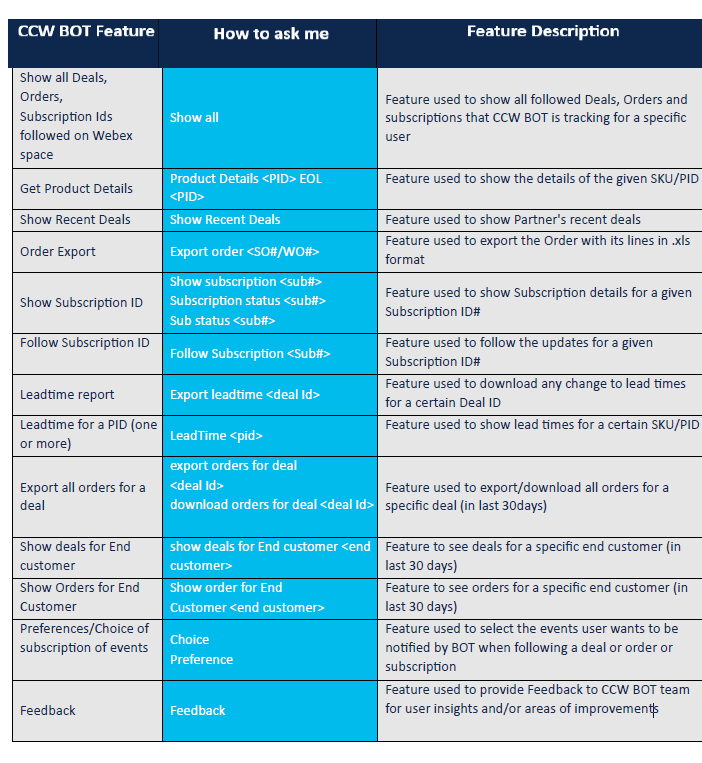
Below is a cheat sheet outlining the features of the Bot and how to ask questions. This should be useful for you.

 CRAZY NETWORKING