Cisco Commerce Workspace – Renewals (CCW-R) is an integrated web page that partners and service providers use to book and renew service contracts. Engineers often use this to find contracts associated with the serial number instead of using the Device Coverage Checker tool.
To access CCW-R, you need to log in to CCW-R https://ccrc.cisco.com/ccwr/?. Instead of logging in to the webpage, you can use a BOT to help you with CCW-R features.
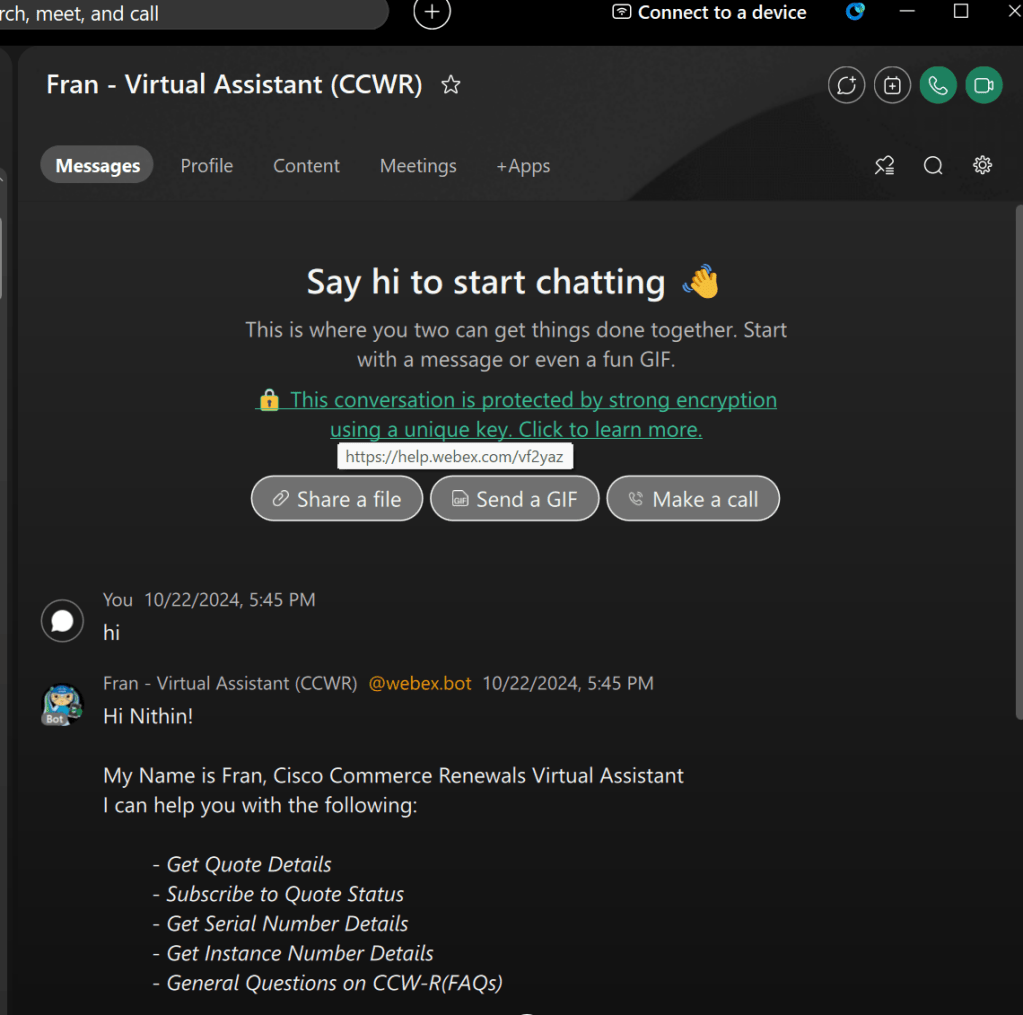
There is a BOT that you can add to your Webex space, which can assist you with the following tasks:
- Get Quote Details
- Subscribe to Quote Status
- Get Serial Number Details
- Get Instance Number Details
- General Questions on CCW-R (FAQs)
How to get the BOT:
To add the BOT to a space, create a space and add the bot by searching for ccwrprod@webex.bot. You can also message the bot directly by searching for ccwrprod@webex.bot and sending a direct message.
Once added, you will find “Fran – Virtual Assistant (CCW-R)” as a Direct space if added directly, and as a participant if added to a space. When messaging in the space, you need to start your message with @Fran. When messaging directly, there’s no need to add @Fran.
 CRAZY NETWORKING